
What SMBs Need Before Their First Breach
“We’re Too Small to Be a Target”
It is one of the most common things we hear from founders. Hackers go after banks and big brands, the thinking goes, not a twenty-person business on a local high street.
Unfortunately, most attacks are not personal. Phishing emails, password-guessing and automated scans for unpatched systems are sent out in bulk, and they find whoever is easiest to get into. Smaller businesses are often exactly that: busy, under-resourced and running on systems nobody has reviewed in years.
Most SMBs only think seriously about security after something goes wrong — a hijacked email account, a fraudulent invoice paid, a laptop lost with customer data on it. By then, the cost is already being counted.
Why Bolted-On Security Costs More
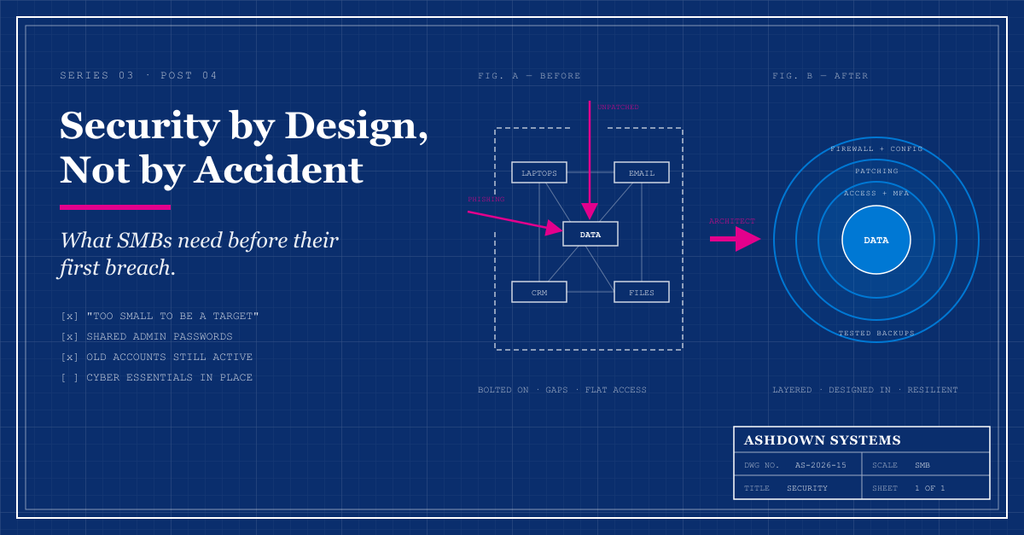
When security is an afterthought, it gets added in layers on top of systems that were never designed for it. The result is usually expensive, inconvenient and still full of gaps.
Consider a business where everyone shares one admin login, customer data is copied between a dozen tools, and old staff accounts are never switched off. Fixing that after a breach means untangling years of shortcuts while also dealing with the incident itself, notifying customers and, if personal data is involved, potentially reporting to the Information Commissioner’s Office.
Building security in from the start is far cheaper. It is the same lesson as technical debt: decisions that save a few hours today can cost weeks to unpick later.
What “Security by Design” Actually Means
Security by design sounds like something only large enterprises can afford. In practice, it comes down to a handful of principles that any SMB can apply:
- Least privilege.
- People and systems get access to what they need for their role, and nothing more. The office manager does not need admin rights to the finance system.
- Identity first.
- Every person has their own account, protected by multi-factor authentication, and accounts are removed promptly when people leave.
- Know your data.
- You understand what sensitive data you hold, where it lives and who can reach it — which is far easier when it is not scattered across spreadsheets and inboxes.
- Defence in depth.
- No single control is relied on to stop everything. If a password is phished, MFA stops the attacker; if a laptop is lost, encryption protects the data.
- Plan for recovery.
- Assume something will eventually go wrong, and make sure you have tested backups and a clear plan for what happens next.
Cyber Essentials: A Practical UK Starting Point
For UK businesses, the government-backed Cyber Essentials scheme, run on behalf of the National Cyber Security Centre, is the natural place to begin. It focuses on five technical controls that defend against the most common attacks:
- Firewalls
- Controlling what can reach your devices and services from the internet.
- Secure configuration
- Removing default passwords and switching off what you do not use.
- Security update management
- Keeping software and devices patched promptly.
- User access control
- Giving people only the access they need, with strong authentication.
- Malware protection
- Stopping malicious software from running.
There are two levels: Cyber Essentials, a verified self-assessment, and Cyber Essentials Plus, which adds independent technical testing. Certification is increasingly requested by customers and is required for some public-sector contracts, so it can win business as well as reduce risk.
It is a baseline, not a finish line. But for many SMBs, working through it reveals exactly where their systems were never designed with security in mind.
A Proportionate, Architecture-Led Approach
Good security for an SMB is not about buying every product on the market. It is about making sound structural decisions, then layering sensible controls on top.
- Map your systems and data.
- Identify what you rely on, what sensitive data you hold and where it flows. You cannot protect what you cannot see.
- Centralise identity.
- Use a single identity provider with multi-factor authentication for as many tools as possible, so access can be granted and removed in one place.
- Reduce your attack surface.
- Retire unused tools and accounts, consolidate where you can, and avoid copying sensitive data into systems that do not need it.
- Bake security into every decision.
- When choosing a new tool or building something new, ask how access, data and updates will be managed before you commit — not afterwards.
- Prepare for the bad day.
- Keep backups separate from your main systems, test that you can restore them, and write down who does what during an incident.
These steps cost far less than a breach, and most can be done without slowing the business down.
Before, Not After
The best time to think about security was when you chose your first system. The second-best time is now, before your first breach rather than after it.
At Ashdown Systems, we help UK startups and SMBs review how their systems and data fit together, identify the gaps that matter most, and build security into their architecture in a way that is proportionate to their size and budget. If you would like a clearer picture of where you stand, we would be happy to help.